Your client's ledger is not a prompt
Allwis ·
AI can save accountants hours of work. But uploading a client's general ledger to a public chatbot can expose far more than the figures you're trying to reconcile.
Scroll through LinkedIn, TikTok or an accounting Facebook group and you'll find accountants using AI to speed up routine work. Someone exports a ledger from Xero, a payroll report from QuickBooks or a client's spreadsheet, uploads it to a chatbot and gets a result in seconds.
The productivity gains are real. We build AI into accounting software ourselves, and we believe it will make a meaningful difference to the profession.
The problem is what goes into the chatbot along with the data the job needs. A ledger or payroll export can contain client names, bank account details, salaries, tax file numbers and supplier information. Uploading it to an external service can disclose all of that to a provider the client never agreed to use. Depending on the data and the service, that can breach privacy law or professional obligations, and in some cases the consequences are more serious.
The question isn't whether accountants should use AI. It's whether they understand what happens to client information when they do.
What happens to a file after you upload it?
An uploaded file is processed under the provider's terms, privacy settings and data-handling arrangements. Know them before you send client information.
- How long is it kept? Retention policies differ. Deleting a conversation doesn't necessarily delete every copy: backups, security investigations and legal holds can keep data around.
- Can it train the model? Some consumer plans use conversations for model improvement unless you opt out. Business plans may offer better protection, but only under the specific contract. A free account and an approved business deployment are not equivalent.
- Who can see it? Providers may allow limited human review for safety, support or quality. Find out whether provider staff or contractors could read your client's information.
- Where is it processed? Often outside Australia, which raises cross-border disclosure and contractual questions for the practice.
- What protects the account? A personal account with a weak password, no MFA and months of client uploads is a serious exposure if it's compromised. Shared-conversation links and third-party integrations add to the risk.
- Can you reconstruct what happened? Without a register of approved tools, the practice may not know which files went where, or which clients were affected. That makes a suspected breach much harder to investigate.
None of this requires a provider to act maliciously. The risk comes from using a service without knowing whether it is fit for confidential client information.
The legal and professional obligations
Clients reasonably expect their information to stay confidential. Sending it to an external AI provider can engage several legal and professional requirements at once. The table is a starting point for Australian and New Zealand practices, not legal advice.
| Obligation | Why an AI upload may matter |
|---|---|
| Tax file numbers: Taxation Administration Act 1953 (s 8WB) and Privacy (Tax File Number) Rule 2015 | Payroll and employee exports may contain TFNs. Their use and disclosure are tightly restricted, and an unauthorised disclosure can have serious consequences. |
| Privacy Act 1988 (Cth), including APPs 6, 8 and 11 | Covered practices must consider the purpose of a disclosure, overseas recipients and the security of personal information. An unassessed provider creates compliance risk. |
| Notifiable Data Breaches scheme | If information is exposed, the practice may need to assess whether an eligible data breach has occurred and notify the OAIC and affected individuals. |
| Tax Agent Services Act 2009 and the Code of Professional Conduct | Tax practitioners must weigh their confidentiality obligations before disclosing client information to an external service. |
| APES 110, Code of Ethics for Professional Accountants | The confidentiality principle covers information obtained through professional relationships. Using AI doesn't remove that responsibility. |
| New Zealand Privacy Act 2020, including IPPs 5, 11 and 12 | Security, disclosure and overseas-disclosure requirements apply when client information goes to an AI provider. |
| GDPR and UK GDPR | Where they apply, they add lawful-processing, processor-agreement and international-transfer requirements. |
Two points deserve attention. First, don't assume the Privacy Act's small business exemption settles the question: TFN information has its own rules, and contractual obligations can apply regardless. Second, the cost isn't only regulatory. A client who learns their payroll records went into a chatbot without authorisation may not stay a client, whatever a regulator decides.
AI brings risks ordinary storage doesn't
Language models behave differently from accounting systems, and the difference matters once AI is connected to business data or allowed to act.
- Prompt injection. A document, email or supplier invoice can carry instructions aimed at the model. If the assistant can also reach your email, files or ledger, that content can steer what it does, and the risk grows with every permission it has.
- Excessive access. Some integrations ask to read and change everything. If one is compromised or its token is stolen, every client record it can reach is exposed. Grant only the permissions a tool needs.
- Live connections to the ledger. Connecting an AI assistant to Xero, QuickBooks or your practice software through an API or MCP connector gives it ongoing access to every client the connection can reach, usually unmasked and often with permission to make changes. Combined with prompt injection, a single hostile document can steer an assistant that can read, or alter, every set of books you manage. Connect only with read-only, narrowly scoped access, and keep a record of which clients each connection can see.
- Wrong numbers that look right. A model can misread a transaction, pick the wrong account code or produce an incorrect GST figure, and the answer still looks convincing until it's checked against source records.
- No audit trail. A chat history rarely records the source data, model version, changes made or checks performed, so an error is hard to investigate.
- Cross-client leakage. Memory and conversation context can carry information from one client into work on another unless the system isolates them.
- Account compromise. A chatbot account holding months of client uploads is an attractive target, and it often sits outside the practice's MFA and offboarding processes.
None of this makes AI unsuitable for accounting. It means the controls around a tool have to match the sensitivity of the work.
This has already happened
These risks aren't hypothetical. Each of the following was reported publicly, and each matches a risk above.
- Customers shown each other's data. In January 2025 Sage briefly took its early-access AI assistant, Sage Copilot, offline after a customer who asked it to list recent invoices was reportedly shown information from other customers' accounts. Sage called it a minor issue affecting a very small number of customers, said what appeared was unrelated business information rather than invoices, and fixed it within hours (The Register).
- A fabricated court quote in a government report. In October 2025 Deloitte Australia agreed to partially refund the A$440,000 it was paid for a report to the Department of Employment and Workplace Relations. A researcher had found a quote attributed to a Federal Court judge that the judge never wrote, and references to research that doesn't exist. The revised report disclosed that Azure OpenAI was used in writing it (Associated Press).
- Research that doesn't exist in a health workforce plan. A month later, a plan Deloitte prepared for the Newfoundland and Labrador government, at a cost of about C$1.6 million, was found to cite at least four research papers that don't exist. Deloitte said AI was used selectively to support a small number of citations and that its findings stood (Canadian HR Reporter).
- Invented tax cases before a tribunal. In Harber v HMRC (2023), the UK First-tier Tribunal found that nine earlier decisions a taxpayer relied on in a penalty appeal had been generated by an AI system and didn't exist. The appeal was dismissed (Legal Futures).
None of these began with someone pasting a ledger into a chatbot. They are failures of checking and of keeping clients apart, the same two failures the risks above describe.
Regulators have noticed. In July 2026 the Tax Practitioners Board issued guidance on AI and the Code of Professional Conduct (TPB(GS) 55/2026). It says entering client information into an AI tool can be a disclosure to a third party, which needs each client's permission, and that practitioners remain accountable for the accuracy of advice prepared with AI.
Using AI safely: a checklist for practices
- Write an AI policy: approved tools, the data each may handle (public, de-identified or confidential), and who can approve new integrations
- Check each provider's contract for training, retention, access, deletion and processing location before sending client data. A paid subscription alone is not a security guarantee
- Keep TFNs, bank details, salaries and identity documents out of consumer services that aren't approved for them
- Remove or mask identifiers before anything leaves your systems
- Update engagement terms and privacy notices to explain your AI use and the third parties involved, and get consent where required
- Keep a register of AI tools and the data each can reach
- Require MFA on every AI account, and include those accounts in staff onboarding and offboarding
- Add AI-related incidents to your breach response plan
- Review AI output: reconcile figures to source records and hold it to the standard you'd expect of a staff member
- Treat AI as an assistant whose work needs checking, not an authority whose answers you accept
How we approach this at Allwis
We built Allwis so practices can use AI without moving client data into a separate, unmanaged chatbot. That means the controls live in the product, not in each staff member's memory.
Identifying details are masked before they reach a model
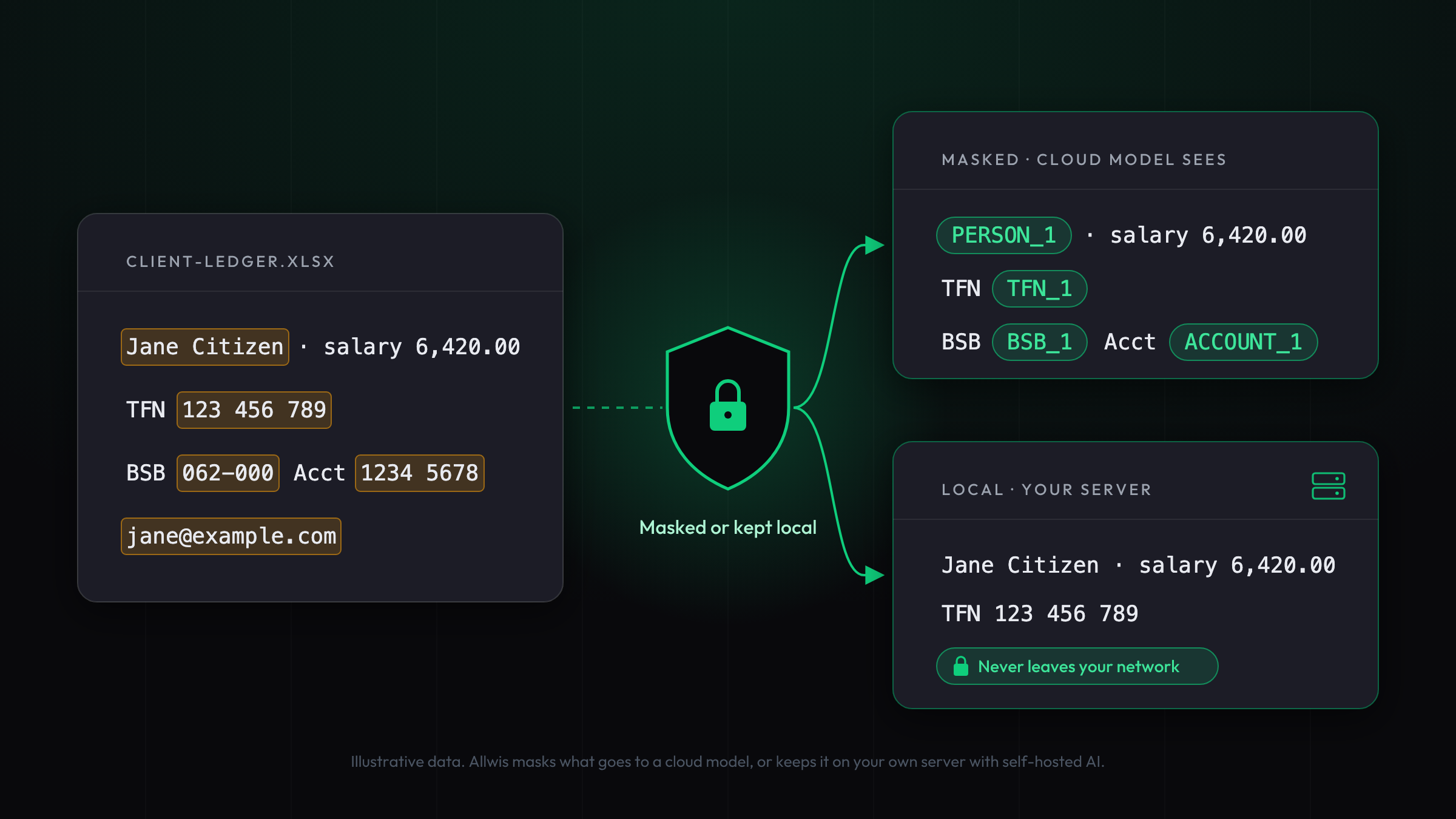
Before a prompt goes to a cloud model, Allwis replaces identifying details with placeholder tokens and restores them when the answer comes back. When masking is on, it covers email addresses, phone numbers, ABNs, BSBs, bank account numbers, TFNs, US Social Security numbers, addresses, and the names of people and businesses matched against the workspace's own records. The model sees PERSON_1 and ACCOUNT_1, not your client. Administrators can require masking task by task.
Masking reduces what the provider receives. The remaining text can still be confidential, which is why the next controls exist.
Documents are masked too
PDF bank statements and bills usually carry a text layer. Under a masking policy, Allwis reads that text itself, masks it and sends only the masked text, so the original file never goes to the provider. A photo or scan that can't be read this way is never sent to the cloud unmasked: it stays on the workspace's own self-hosted model.
Processing can stay on your own infrastructure
Workspaces can connect a self-hosted model on their own server and switch on self-hosted-only mode. Chat, document reading, search embeddings and call transcription then stay on that infrastructure. If a capability has no local model configured, Allwis refuses the call rather than quietly falling back to a cloud provider.
That last point matters most. A local-processing policy only means something if the system enforces it when a task can't be done locally.
Requests are checked before any model sees them
When someone types a request into the Allwis Concierge, a fixed, rule-based check looks for sensitive information first. Depending on the administrator's policy, the request triggers a warning, stays on the self-hosted model or is blocked. The check never stores or sends the value it finds. Practices get consistent rules instead of relying on staff to remember them.
Payroll stays out of external AI by default
Payroll figures go to an external AI provider only if the workspace opts in, and that setting is off until an administrator turns it on. Tasks involving financial, payroll or helpdesk data are also marked sensitive: routing them to a provider whose terms don't exclude training by default takes an explicit, audited acknowledgement from an administrator.
Outside AI agents get read-only access, and every change needs a person's approval
If you connect your own AI agent to Allwis, only an administrator can issue its token, it can read and propose but not change anything, and every proposal waits for a person to approve it in Allwis. A workspace set to self-hosted only can't connect an outside agent at all.
Every AI action is recorded
Each AI call is logged with its task, provider, model and cost, and stored AI output records which model produced it. Administrators can switch off individual AI tasks and set spending limits. AI review features flag anomalies for a person to decide on; they never change financial amounts themselves.
Underneath, row-level security separates every workspace and entity, sign-in requires multi-factor authentication, and changes are recorded in an audit log.
AI security is a design decision
No AI is risk-free. Masking reduces exposure, local processing limits what leaves your systems and audit logs improve accountability, but no single control covers every threat.
What matters is where the controls sit. If security depends on every accountant remembering which files they can paste into which chatbot, mistakes are inevitable. The safer approach is to build the controls into the accounting workflow: limit what a model can see, decide where processing happens, restrict what integrations can reach, and keep the records that show what happened.
That is the approach behind Allwis. AI should give accountants more time for judgement, without asking them to compromise the confidentiality their clients depend on.
See it on your own workflows. Allwis is invite-only while we onboard practices. Tell us about your firm and we'll show you masking and self-hosted AI on your own work.
This article is general information, not legal advice. Your obligations depend on your circumstances, the information involved and the services you use. Seek professional advice about your own situation.